
Preparing for School FAQ
We know that getting ready for a new school year can bring up a lot of questions for students, guardians, and extended family alike. To help, we've created this FAQ page as a starting point for some key topics.
While we may not have every answer right here—especially for more detailed information—we will do our best to help you or direct you to a staff member who can. We are committed to helping you find the information you need so you're all ready for the start of school.
Am I ready to start on the first day of school?
New Families
You do not have to complete the Agreements Worksheet. Most of the information on it was already finished during the admissions process.
Returning Families
Yes, you do need to complete the Agreements Worksheet. It has a bunch of important agreements, such as the Technology Agreement, Consent to Publish, and Lifestyle Commitment (for grades 6-12).
You are financially cleared once you have submitted your enrollment packet, selected your tuition plan, and made your first payment.
You are medically cleared once your student is up-to-date on their immunizations and you have submitted all required medical forms.
Required Medical Forms
- Physical Assessment Form: Required for all new incoming students, all 9th graders, and any student in grades 6-12 who plays sports.
- Oral Assessment Form: Required for all incoming kindergartners and any new student who has not previously attended an in-person school.
- 7th Grade Immunizations: All students entering 7th grade must have one Tdap shot.
Optional Medical Forms
- Self-Medication Administration Consent Form: This form is only required if your student needs to carry and self-administer medication at school.
- Physician's Order for Administration of Oral Medication by School Personnel: This form is only required if your student has a doctor-prescribed medication that needs to be administered by school staff during school hours.
What do I need to buy?
No, we do not have uniforms, but we DO have a standardized dress code. This means that there is a standardized look and color palette for attire, but that you are able to purchase the required attire from your preferred retailer. You can find the dress code rules below along with a look book sheet.
Sort of. While there are days when your student has the option to participate in an “alternate” dress code.
For example, we have two regular spirit days each week:
- Wednesdays are “College/University Day.” Students can wear a college/university t-shirt or sweatshirt, but they still need to wear regular dress code bottoms.
- Fridays are “Bulldog Fridays.” Students can wear RAA merch and jeans, as long as the jeans don't have holes.
There also special dress-up days during spirit weeks. If your student doesn't want to participate in any of these special days, they are required to wear their regular school dress code attire.
Good news! You don't have to worry about buying school supplies. We've got it all covered and will provide your student(s) with all essential school supplies.
All they need to bring on the first day is a backpack, a lunchbox (if they're not getting school lunch), and a water bottle.
If your student wants any special supplies, like a particular pen or a unique notebook, you'll need to purchase those items separately.
For students in grades 7-12 taking a Physical Education class, PE uniforms are required. The basic uniform consists of a T-shirt and shorts, which can be worn all year.
If a student wants to wear layers for cold weather or prefers a different material, there are optional items available for purchase.
PE uniforms are available for purchase through our online merch store.
Your student can wear their school hoodies, jackets, or other outerwear any day of the week. As for school shirts other than collared or polo shirts, those are reserved for “Bulldog Fridays.”
You can buy school merch directly from our school's online store. It's the best place to find all the latest gear!
The days of hunting down the best textbook deals are over. Textbooks are included in the cost of your tuition, so you don't have to worry about buying them separately. Just keep in mind that they are on loan for the year and will need to be checked in at the end of the school year.
What should we expect for the First Day of School?
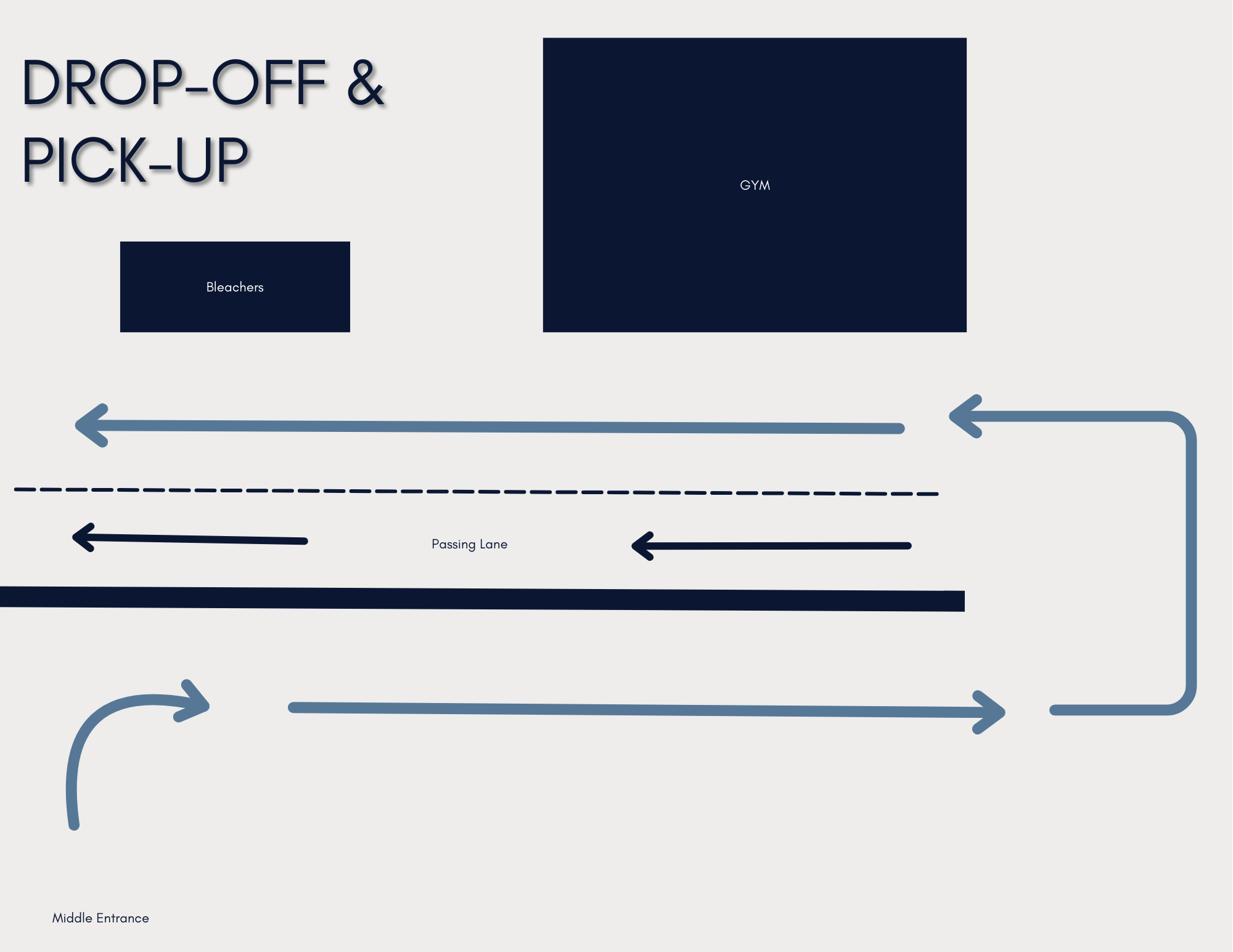
Drop-off
You can drop your student off as early as 6:30 a.m. A minimal fee is charged for before-school care from 6:30 a.m. to 7:30 a.m. However, from 7:30 a.m. until the start of school—8:15 a.m. on Monday-Thursday and 8:00 a.m. on Fridays—before-school care is free.
The drop-off and pick-up process uses the same pathway.
Pick-up
Pick-up is staggered to help traffic flow smoothly and keep lines short. This means different grades have different dismissal times:
- Kindergarten - 2nd Grade: 2:30 p.m. (Monday-Thursday) & 11:45 a.m. (Friday)
- 3rd - 4th Grade: 2:45 p.m. (Monday-Thursday) & 12:00 p.m. (Friday)
- 5th Grade: 3:00 p.m. (Monday-Thursday) & 12:15 p.m. (Friday)
- Middle School: 3:15 p.m. (Monday-Thursday) & 12:30 p.m. (Friday)
- High School: 3:15 p.m. (Monday-Thursday) & 12:35 p.m. (Friday)
For the first week of school, you're welcome to walk your student to class! After that we ask that families drop students off.
If you would like to get involved and assist at the school, we'd love for you to volunteer! Not all teachers or classrooms have the same needs, so if you want to help out in a specific classroom, you'll need to coordinate directly with the teacher and get cleared as a volunteer. There are also other fantastic groups that you can join, such as The Village: Our Home & School Connection!
Look for large directional signs that will guide students to their classrooms. In addition, teachers will be standing at the door of their classrooms to welcome students. You'll also see members of The Village, our Home and School Connection group, who will be happy to help point students in the right direction.
We go all out to make the first day of school special and welcoming! You can expect a fun atmosphere with a welcoming committee, music, and our mascot, Dozer, making an appearance. We'll have special photo spots set up to capture the moment, and our teachers will be at their doors, excited to welcome students into their new classrooms. It's a day for our whole community to come together and celebrate the start of a fantastic school year!
If your student isn't starting on the first day of school, there are a few things you'll want to check on. This might include making sure you've made your first payment, all required medical documents are up-to-date and submitted, and any other necessary paperwork has been completed.
If your student is starting late, please be sure to review these items. We will do our best to get you and your student oriented and ready to start as soon and as smoothly as possible.
You can find your student's class schedule for grades 6-12 in your Family Portal. To access it, navigate to the "Student" section and then click on "Schedules". If you don't see the schedule, it may be because your student is still being processed and assigned to their classes.
Can you tell me a bit about Campus Life & Policies I should know?
Yes, we offer both before and after-school care.
- Before-school care is available from 6:30 a.m. to 7:30 a.m., with additional supervision provided from 7:30 a.m. until the start of the school day.
- After-school care runs until 6:00 p.m. Monday through Thursday and until 4:00 p.m. on Fridays.
For more detailed information, please refer to our Financial Brochure.
The Village is our Home & School Connection. This group plans a variety of community building events, coordinates with volunteers, and provides a great way for you to get involved and connect with RAA's community.
Cell phones and other personal electronic devices are allowed on campus, but their use is restricted to before and after the school day.
During School Hours
During school hours, students should not use personal electronic devices—this includes during lunch and between classes. If a student needs to contact a parent, they should ask the supervising teacher for permission to use the office phone.
Before and After School
Students can use their phones before the start of the school day and after dismissal for communication purposes, such as coordinating with parents for pick-up. Parents, we kindly ask that you do not text your child during the school day.
Policy Violation
Any violation of this policy will result in the electronic device being confiscated and held in the School Office until the end of the school day.
Yes, we do have vegetarian or vegan lunch available for purchase.
You can order lunch for your student online. For specific details and instructions on how to place your order, please visit our dedicated lunch page by clicking the button below. Alternatively, you can find the information by navigating to the "Parents" section of our website, scrolling to "Lunch Program," and following the directions there.
The school handbook is a document that outlines all of our school policies. It's meant to serve as a guide for our families, communicating our expectations and helping you understand how our school and systems work.
Prearranged Absence
If you know your student will be absent in advance, you can fill out a prearranged absence form and turn it in at the school office.
For a Same-Day Absence
If your student will be absent on a particular day, please call the Attendance Hotline at (909) 793-1000 (follow the prompts to connect with the Attendance Hotline) by 7:45 a.m. on the day of the absence. When you call, you'll need to provide the following information:
- The date of the absence
- Your student's name
- Your student's grade
- The reason for the absence
Yes, we have many volunteering opportunities at RAA! To be cleared as a volunteer, you'll need to complete our volunteer process.
This process has recently changed, so for the most up-to-date information, please reach out to Claudette Sanders. She can guide you on the next steps to take. We will also be updating our volunteering page on the website soon with the new details.
How do I stay in the loop?
ParentSquare is our main communication hub for both school-wide and classroom news. It's where you'll find the weekly newsletter, important updates, urgent messages, and event reminders.
From ParentSquare:
"What to do:
- Go to parentsquare.com/signin (or install the ParentSquare app) and follow the prompts to sign up.
- Use Google single sign-on, your email, or your phone number to set up your account. Your email/phone number must match contact details in the school’s database for this to work!
- If your contact details aren’t recognized, contact your school administrator to get them added. After they update your information in their database, the new contact details will appear in ParentSquare after the next daily sync, and you will be able to create an account.
Note: After you are added to ParentSquare by your school, you will receive school communications even if you have not registered your account. However, you will need to register your account in order to participate in two-way communications and to access any confidential student-specific documents or forms."
You can find answers to more frequently asked ParentSquare Questions here:
Parent-teacher conferences are usually held twice a year: once at the beginning of the school year and again closer to the end.
If you have questions for a teacher between those times, please reach out directly to them to set up a time to speak.
You can reach out to your student's teacher via ParentSquare, email, or phone. Your student's teacher will also let you know the best way to contact them.
You can find our full school calendar on the school website. Additionally, a printable weekly calendar is included in the weekly newsletter for a quick, at-a-glance view.
The weekly newsletter is your go-to resource for staying connected. Each edition features important upcoming events, engaging stories from our campus, and school-wide announcements.
We have a school app that is a great resource for managing many of your school-related tasks.
With the app, you can:
- Order lunch
- Connect with the family portal
- Make payments
- Check grades and attendance
- Donate to the school
- See all school-wide announcements
Who should I contact?
Claudette Sanders is your go-to person to contact regarding all things volunteering.
Kathy Iwasa, our registrar, is the one who will be able to answer your questions about schedules.
Kay Bracker, our marketing & enrollment coordinator, can help you with general questions about the registration checklist.
New Families: What else do I need to do?
Yes, your student can attend on the first day of school as long as their immunizations are up-to-date and on file.
We understand that it can be hard to get appointments, so we are allowing students to attend even if their physical hasn't been submitted yet. In the meantime, please share any information you have from their most recent physical, let us know the date of their new appointment, and be sure to send us the updated records as soon as you receive them.
Unfortunately, no. We are unable to have a student start school until the enrollment process is fully completed. This is essential for a smooth start to the school year, as it allows us to finalize your student's class placement and ensure all payment information is in place.
The only exception is the one we discussed regarding medical documents: a student can attend if their immunizations are on file and up to date, even if the physical exam report hasn't been submitted yet.
Please make sure all of your paperwork is finished, and we will be ready to welcome your student to campus as soon as the process is complete!
Yes, I have set up my Family Portal.
That's great! The next step is to make sure you've completed and submitted the enrollment packet within the portal. This ensures everything is ready for your student to have a smooth start to the school year.
No, I have not yet set up my Family Portal.
It's essential to set up your Family Portal as soon as possible. Without it, you won't be able to access the enrollment packet, which means we can't finalize your student's class schedule or set up your tuition plan.
Yes, I have submitted my enrollment packet.
That's great! This means your student will be placed into classes, added to Google Classroom, and all the necessary behind-the-scenes work can be completed. The final step before the first day of school is to make sure your first payment has been processed. Once that's done, you're all set for a smooth start to the school year!
No, I have not yet submitted my enrollment packet.
Please submit your packet as soon as possible. This is a crucial step that allows us to place your student in classes and get all the necessary back-end systems set up for them.
Yes, I have made the first payment.
That's great! As long as you've completed all other necessary items, your student is all set to attend on their first day of school, whether that is the first day of school or the date communicated to you.
No, I have not made the first payment.
You'll need to submit your first payment to ensure your student can start school. While our system may show a later deadline, the first payment must be processed before the start of school. We are unable to change the due date for the initial payment in our system.